RPG Developer BAKIN: Input Control
A downloadable game
Bakin script
Free
InputForceToggle (EN,CH,JA)
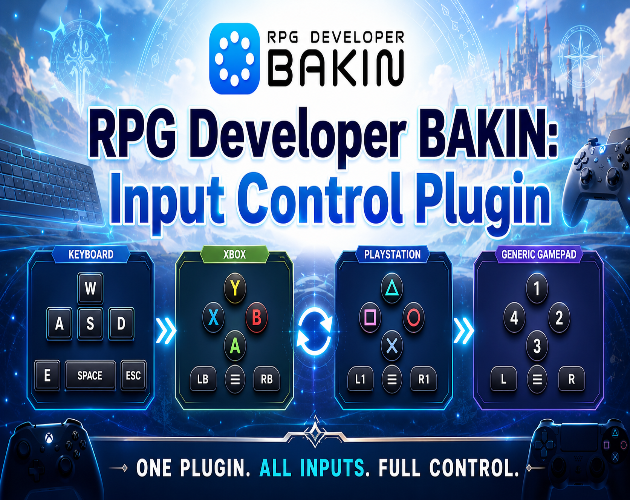
Per-device input blocking, auto-detection, and gamepad identification for RPG Developer Bakin. Lock input to keyboard, controller, or let the engine detect which one the player is using — all from a single C# script with no external dependencies.
🕹 Xbox, PS5, PS4, DInput, XInput
📄 Single .cs file, drop-in install
⚙ Zero external dependencies
What it does
InputForceToggle gives you complete control over which input devices are active in your Bakin game at any time. It intercepts input at the hardware binding layer — not just the state buffers — so analog stick movement is blocked even if the engine reads controller values before scripts run.
🔒
Force a device
Lock input to controller only or keyboard only with a single function call. The blocked device is completely silenced — buttons, D-pad, and analog sticks.
🔌
Auto-detect last used
Auto mode tracks which device the player used most recently and blocks the other in real time. Switching is instant — no polling delay.
🎮
Identify the gamepad
Detects whether the connected controller is a PS5 DualSense, PS4 DualShock, or Xbox / XInput pad by reading the DirectInput product name at the OS level.
👁
Button icon switching
GetCurrentDevice() and GetGamepadType() give you everything needed to swap button prompt icons — show Cross/Circle or A/B depending on what's plugged in.
⚡
Hardware-layer blocking
Re-registers PAD bindings on the XInput Controller with a silent InputID so getValue() returns 0 at the source, before movement can read it.
📊
Any input check
IsAnyInputActive() returns "1" or "0" — useful for press-any-button screens, idle detection, and waking from pause states.
Functions
| Function | Argument | Returns | Description |
|---|---|---|---|
SetDeviceMode |
"gamepad" "keyboard" "auto" "off" |
string | Activates a blocking mode. Returns the mode that was set. |
GetDeviceMode |
none | string | Returns the current mode: gamepad, keyboard, auto, or off. |
GetCurrentDevice |
none | "gamepad" | "keyboard" | Returns the most recently used device. Updated every frame. Primary way to drive button icon display. |
GetGamepadType |
none | "ps5"|"ps4"|"xbox"|"generic"|"keyboard" | Identifies the controller by reading the OS-level DirectInput product name. |
IsAnyInputActive |
none | "1" | "0" | Returns "1" if any device has active input this frame. Useful for press-any-button screens. |
DiagnoseInput |
none | "ok" | Writes full detection state to the debug log. Hold a button while calling for best results. |
InitReflection |
none | "ok" | "error" | Re-runs internal setup. Call if detection stops working after a controller is connected. |
Controller support
✓
PS5 DualSense
DirectInput native
✓
PS4 DualShock
DirectInput native
✓
Xbox One / Series
XInput
✓
Third-party XInput
Any XInput pad
✓
Generic DInput
Returned as "generic"
✓
Keyboard + mouse
Full support
Installation & usage
1
Add the script file
Place
InputForceToggle.cs in your project's script folder alongside your other scripts.2 ). Attach to a persistent character
Assign
InputForceToggle in the Script slot to a Common Event that runs once in Parallel.3). Verify on startup (optional)
Add a C# Program Call and call InitReflection. Check the debug log — you should see:
// expected log output
InitReflection: ok kb=60 pad=33 din=93 kbMap=30 overrides=33 silentId=359
InitReflection: ok kb=60 pad=33 din=93 kbMap=30 overrides=33 silentId=359
4). Call from events
Use C# Program Call panels to control the mode and read device state:
// on game start
SetDeviceMode("auto")
// drive button icons
GetCurrentDevice() → "gamepad" or "keyboard"
GetGamepadType() → "ps5", "xbox", "ps4", "generic", or "keyboard"
// press-any-button screen
IsAnyInputActive() → "1" or "0"
SetDeviceMode("auto")
// drive button icons
GetCurrentDevice() → "gamepad" or "keyboard"
GetGamepadType() → "ps5", "xbox", "ps4", "generic", or "keyboard"
// press-any-button screen
IsAnyInputActive() → "1" or "0"
ℹ
All blocking, detection, and state updates run automatically every frame once the mode is set. There is no per-frame event call required — just set the mode once and the script handles the rest.
How keyboard mode blocks analog movement
Keyboard mode uses a three-layer approach to guarantee complete blocking regardless of engine timing or read order:
Hardware binding override
All PAD/DPAD bindings on the XInput Controller are re-registered with a silent InputID (kINPUT_COUNT = 359). This makes getValue() return 0 at the native layer, before Bakin's movement system can read any axis value.
State buffer zeroing
Every state buffer is cleared each frame: nowState, triggerState, triggerState2, repeatState, keyBuffers, oldBuffers. ForceSetState(NONE) is also called for every GameState via the engine's own API.
Keyboard state reconstruction
After zeroing, keyboard input is injected back from scratch using a per-bit binding map built at startup. Only keys actually held are injected — gamepad state has no path to survive into the next frame.
Changelog
v1.0
Initial release. SetDeviceMode, GetDeviceMode, GetCurrentDevice, GetGamepadType, IsAnyInputActive, DiagnoseInput, InitReflection. Full XInput and DirectInput support. Hardware-layer binding override for complete analog stick blocking in keyboard mode.
Download
Click download now to get access to the following files:
Leave a comment
Log in with itch.io to leave a comment.